Nowadays, the trend of online shopping has increased significantly, and many e-commerce platforms, such as Amazon, Flipkart, and Meesho, allow people to sell their products. JioMart has also become one of the biggest e-commerce platforms in India. If you want to sell your products on JioMart and are thinking about how to sell on JioMart, then this blog is for you. In this blog, we will guide you step-by-step on how you can sell on JioMart and how you can maximize your e-commerce sales.
If you have just started selling your products on JioMart, then this blog is best for you because in this blog, you get guidance on how to start your business on JioMart, sell your products, and maximize your sales. First, let’s understand what categories JioMart allows on its platform.
Categories Allowed on JioMart Platform
Here are the major product categories that sellers can list on JioMart Marketplace:
- Grocery & Daily Essentials
- FMCG Products
- Fruits & Vegetables
- Dairy & Bakery
- Snacks & Beverages
- Home & Kitchen
- Fashion & Apparel
- Footwear & Accessories
- Beauty & Personal Care
- Health & Wellness
- Baby Care Products
- Electronics & Appliances
- Mobile Accessories
- Books & Stationery
- Office Supplies
- Toys & Games
- Pet Supplies
- Automotive Accessories
- Handloom & Handicrafts
- Home Cleaning Products
- Fitness & Wellness Products
Some categories may require additional compliance documents such as FSSAI, BIS certification, brand authorization, or GST registration, depending on the product type. Now we will understand why you should sell on JioMart in 2026.
Why Should Sellers Start Selling on JioMart in 2026?
JioMart has become one of the fastest-growing e-commerce platforms in India in 2026. It gives a huge opportunity to new sellers to reach millions of online customers in India. Whether you are a small business owner, wholesaler, manufacturer, or D2C brand, selling on JioMart can help you grow your business with lower operational costs and massive customer exposure.
Here are the biggest reasons why you should sell on JioMart in 2026:
-
Expanding your Reach
JioMart is a massive platform that is making its presence in every region. If you sell on JioMart, you can sell your product in every corner of India. You will get exposure to your business, which will be much more than the local market. This platform provides you pan India reach.
-
Leveraging the Power of Trust and Recognition
One of the biggest advantages of being associated with JioMart is that this brand is already trusted among its customers. If you sell on JioMart, you will get the trust of those customers who are already familiar with the Jio brand. This power of recognition and trust will help you boost your sales.
-
Simplified setup process
If you are hesitant to start selling, the JioMart seller setup process is very simple. You just have to do basic registration and profile setup to sell on JioMart, and you’ll have a functional online store. This process is user-friendly, which is perfect for new sellers.
-
Marketing and Promotional Support
JioMart provides marketing support to its sellers. If you sell on JioMart, you get the benefits of a marketing campaign. The platform has promotion and discount options that can make your product more visible. This feature helps in promoting your sales.
-
Easy Integration with Multiple Channels
JioMart is an integrated platform where you can manage your business through multiple channels. If you sell on JioMart, your product is displayed on JioMart’s website and app, which helps reach more customers. This allows you to improve your online visibility.
-
Customer Service and support
JioMart provides strong customer support to its sellers. If you sell on JioMart, you get an easy solution to any technical and operational issues. Experienced customer service teams are available on the platform, which solves your problem quickly.
-
Competitive Commission Structure
The JioMart commission structure is fair and competitive, which benefits the seller. If you sell on JioMart, you must pay a fair percentage of your product sales in commission. These fees are quite reasonable for selling on the platform, which helps the business grow long-term.
-
Diverse product categories
JioMart offers the facility to sell all types of products. Whether you are selling fashion, groceries, electronics, or home goods, you can list your products in any category on JioMart. If you sell on JioMart, you can showcase your product in easily relevant categories.
-
Reliable Payment System
JioMart’s payment system is fast and secure. When you sell on JioMart, you receive timely payment, which smoothens the cash flow of your business. Transactions are handled securely on the platform, which adds a factor of convenience and reliability for you.
-
Analytics and Performance Tracking
The JioMart seller dashboard provides you with a detailed analysis of your performance. If you sell on JioMart, you can track your product sales, customer feedback, and traffic metrics. This data will help you to better optimize your business.
Step-by-Step Process to Become a JioMart Seller
Step 1: Registration on JioMart
If you have to sell on JioMart, the first step is to register your business on JioMart. You have to go to the JioMart seller portal and have to fill in your details. This process is very simple; you just have to provide details such as your business name, email, and GST number.
Step 2: Completing your seller profile
After registration, you have to complete your seller profile. In this, you have to provide your
- business description
- contact details
- bank account information
This step is very important as it showcases your trustworthiness when selling on JioMart.
Step 3: Creating your product Listing and Inventory
Now you have to list your product. You have to provide details of your product, such as
- Description
- Images
- Specifications
- Pricing
- Discounts, etc.
You have mentioned the product SKU number, which will help you in inventory management. When you sell on JioMart, accurate and detailed product listings are very important so that customers get clear information about your product and trust it.
Step 4: Listing your Prices
Take care of the pricing of your products. As a JioMart seller, you have to keep your price competitive so that you can beat your competitors. You have to specify your product price, shipping charges, and any applicable taxes.
Step 5: Start selling in JioMart.
When your profile is complete and products are listed, you can start your selling journey. As a JioMart seller, you will have to process your orders and respond to customer inquiries in a timely manner.
Eligibility criteria to become a JioMart seller
If you want to sell on JioMart, then there are some eligibility criteria you have to fulfill. These criteria ensure that your business is legally registered and you have the required documents and details to avoid any problems on the platform. Let’s see what documents and requirements are needed to become a JioMart seller:
-
Valid GSTIN (Goods and Services Tax identification number)
To sell on JioMart, you must have a valid GSTIN. GSTIN is mandatory as you have to comply with taxes on your sales. If you don’t have a GSTIN, you can’t legally list your business on JioMart. You have to submit your GST registration details when you create your seller account.
-
Identity Proof (Aadhaar Card, PAN Card)
To become a JioMart seller, you need to provide a copy of your
- Aadhaar card and
- PAN Card as identity proof.
These documents validate your identity and assure JioMart that you are an authentic seller. You have to upload these documents at the time of account setup.
-
Bank account details
When you start selling on JioMart, you have to provide your bank account details. These account details are used to transfer your payment to JioMart. JioMart will transfer payment to your account after every sale, so your bank account details must be accurate and updated.
-
Mobile Number
To become a seller on JioMart, you have to register a valid, active mobile number. This number is used for account verification and JioMart communication. You get regular updates on this number, which helps you in managing your business.
If you complete these basic requirements, then you can easily become a seller on JioMart. The JioMart platform gives you an easy and reliable way to sell your product online; you just have to follow these necessary steps.
JioMart Seller Panel Overview
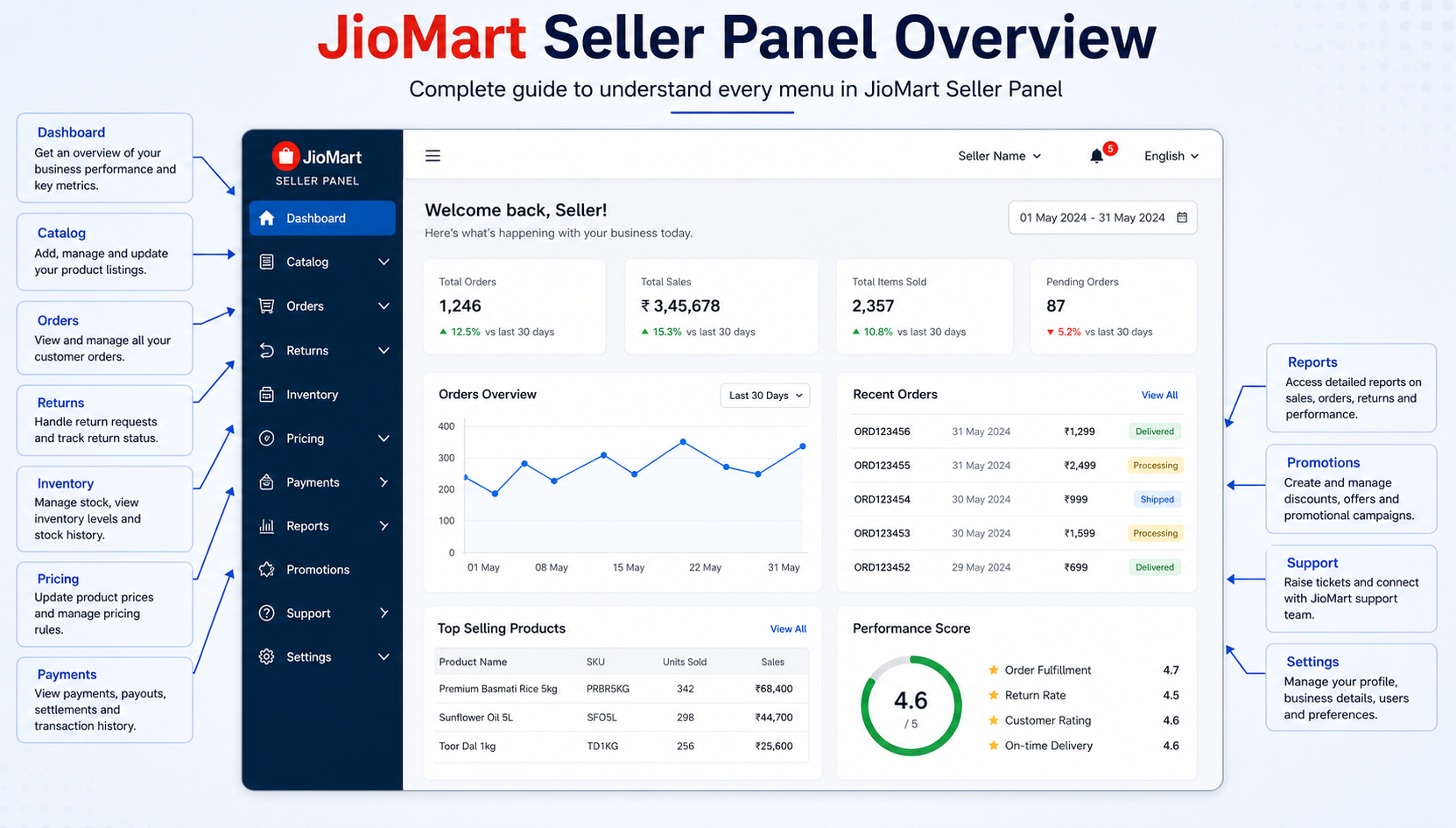
If you are a seller on JioMart, then the JioMart Seller Panel is an important tool. This platform helps you to manage your business efficiently, process your orders, and monitor your performance. Let us understand features and functionalities in detail:
-
Dashboard
The JioMart seller panel dashboard is a centralized hub that gives you a snapshot of the overall performance of your business. Here you get an overview of sales, pending orders, inventory status, and customer queries. While you are selling on JioMart, the dashboard is the first tool that helps you to manage your daily operations.
-
Product Management
Product management then gives you the option to list, edit, or update your product. In this section, you can:
- Add new products.
- Update product descriptions, specifications, and images.
- Can also manage inventory levels to avoid the issue of out-of-stock
For JioMart sellers, the product management section ensures that your listing is accurate and updated.
-
Order Management
Order Management then gives real-time updates on which new orders you have and which orders are pending. Here you can
- Accept and reject orders.
- Generate shipment details.
- See the customer’s timely delivery status.
-
Payments and Settlements
The JioMart seller panel payment then gives you details of your earnings and settlement. You can:
- See past transactions and upcoming payments.
- You can check the breakdown of deductions, such as commission and taxes. This then helps you track your profit with transparency, which is an essential aspect while selling on JioMart.
-
Reports and Analytics
The seller panel’s report or analytics section helps you to analyze your business performance and growth when you sell on JioMart. Here you get details of sales reports, customer behavior insights, and inventory trends. You can use analytics to improve your products and marketing strategies to become a successful JioMart seller.
-
Support and help center
The JioMart Seller Panel provides a dedicated support section that gives you the option to contact us to resolve any issues. FAQs, tutorials, and customer care options are available here to solve the challenges while selling on JioMart.
Tips for running a successful Business on JioMart
Just creating an account on JioMart is not enough. You have to follow some strategies to grow your business:
-
Craft Compelling Product Listings
Your product listing details should be attractive. You can showcase your product in a better way by uploading high-quality images and catchy descriptions to sell on JioMart.
-
Price Competitively
Keeping prices competitive is very important. If you sell your products at the right price, then your customers will prefer your products. To become a successful JioMart seller, market research is very important so that you can make your pricing strategies better.
-
Master Inventory Management
As a JioMart seller, you have to manage your inventory properly. Stock-outs can affect your credibility, so update your stock in a timely manner.
-
Leverage Marketing & promotions
When you sell on JioMart, JioMart provides you with promotion options. You can create discount coupons and offers to boost your sales. Other than this, you can also promote your products.
-
Prioritize customer service
It is very important to pay attention to customer service when selling on JioMart. If you answer quickly and effectively to your customers’ queries, your customers will prefer to do long-term business with you.
How to add Product on the JioMart Seller panel
Adding your product to the JioMart Seller Panel is a simple process. By following this step-by-step guide, you can easily list your product and your business as a JioMart seller.
Step 1: Log in to the JioMart seller panel.
- Use your registered email ID and password login on JioMart Seller Panel.
- Once you log in, you see the dashboard from where you can manage your seller account.
Step 2: Navigate to the product section
- Click on the “Product” option on the dashboard.
- Here, you will get the option of “Add new Product”; click on it.
Step 3: Fill Product Details
When you sell on JioMart, you have to give basic and advanced details of your product:
- Product Name
- Category Selection
- Product Description
Step 4: Upload high-quality images.
- Upload high-resolution images of your products.
- Upload images from multiple angles.
Step 5: Add product specifications
- List Important specifications of products such as size, weight, color, materials, etc.
- If there is a variation in the product, then mention that it also
Step 6: Set the price and stock details.
- Set competitive prices for your product while selling JioMart.
- Provide Stock Keeping Unit (SKU)
- Mention the quantity of available products
Step 7: Add Shipping details
- Specify product shipping weight and dimensions
- Mention shipping charges.
Step 8: Submit for approval
- After checking all the details, click on “Submit for Approval.”
- The JioMart team will review your product, and after approval, your product will go live.
FAQs: Frequently Asked Questions
Q1: How to become a JioMart seller?
Answer: You have to register on the JioMart Seller Portal. You have to upload business details, GSTIN, PAN card, and bank account information. After verification, your account will be activated, and then you can sell on JioMart.
Q2: To become a JioMart seller, what documents are required?
Answer: You are required to
- GSTIN
- PAN card
- Aadhaar card
- Bank account details
Q3: How to list products on JioMart?
Answer: You have to log in to your JioMart seller account, go to “Product Section” and click on “Add New Product,” and then add your product details.
Q4: How to set competitive prices on JioMart?
Answer: While selling on JioMart, you have to analyze your competitors’ prices. To attract customers, keep reasonable prices to maintain a profit margin.
Q5: How do I receive payment on JioMart?
Answer: When your product is sold, then JioMart transfers the payment or every sale in your bank account weekly.
Conclusion
It is a lucrative opportunity to start your business on JioMart. If you follow the proper strategy, then you can scale your business quickly. In this blog, we have provided a step-by-step guide on how to sell on JioMart. Now you just have to list your product and track your sales. If you keep an eye on your customer service and marketing, then you can business will be successful on JioMart.